We need your help to keep this website free. You can buy us a coffee to support us.
How to Download Instagram Reel Thumbnails on Desktop?
Step 1: Open Instagram in Your Browser
Go to instagram.com and log into your account (if required).
Step 2: Open the Reel
Find the Reel whose thumbnail (cover image) you want to download.
Click on it so it opens fully on your screen.
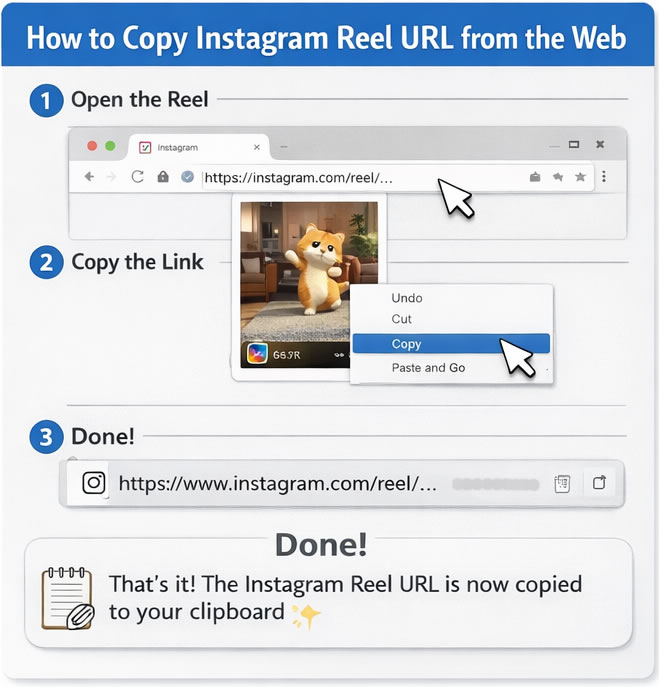
Step 3: Copy the Reel URL
Go to the address bar at the top of your browser.
Click on the link (it looks like: https://www.instagram.com/reel/...)
Right-click and choose Copy.
Step 4: Open the Thumbnail Downloader Website
Open a new tab and go to the Instagram Reel Thumbnail Downloader website.
Step 5: Paste the URL
Click inside the search box on the website.
Right-click and choose Paste.
Then click the Download or Get Thumbnail button.
Step 6: Download the Thumbnail
After a few seconds, the Reel thumbnail (cover image) will appear.
Click the Download button to save it to your computer.
How to Download Instagram Reel Thumbnails on Mobile (Android & iPhone)
Step 1: Open the Instagram App
Open Instagram and find the Reel you want.
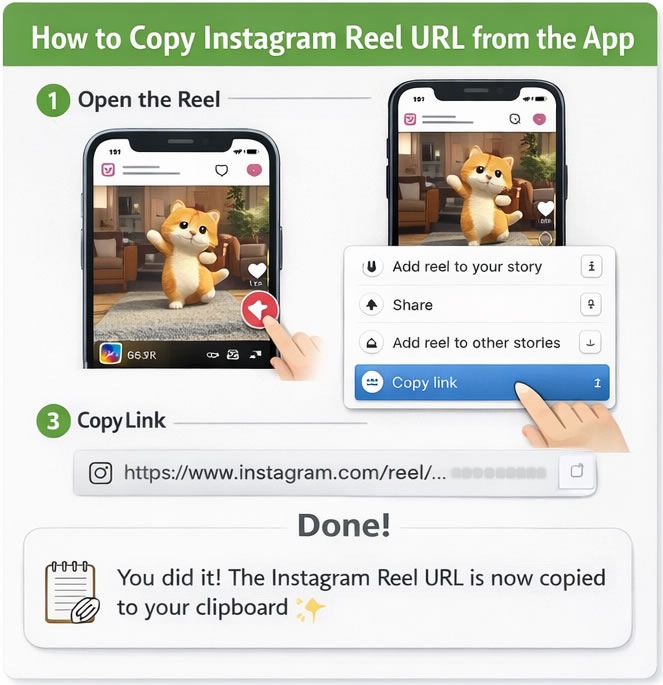
Step 2: Tap the Three Dots (...)
On the Reel screen, tap the three dots icon (usually on the bottom or side).
Step 3: Tap “Copy Link”
Select Copy Link from the menu.
The Reel link is now copied to your phone.
Step 4: Open Your Browser
Open Chrome, Safari, or any browser on your phone.
Go to the Instagram Reel Thumbnail Downloader website.
Step 5: Paste the Link
Tap inside the search box.
Press and hold, then tap Paste.
Tap the Download button.
Step 6: Save the Thumbnail
The Reel thumbnail image will appear.
Tap Download and save it to your gallery or files.
Important Notes
● This method works only for public Instagram Reels.
● Private accounts’ content usually cannot be accessed.
● No app installation is required — everything works in your browser.
● If you follow the steps slowly, it will take less than one minute.
Best Online Instagram Photo Downloader
Looking for the best online tool to download Instagram photos and thumbnails? Our tool makes it fast, easy, and completely free to get high-quality thumbnails from Instagram posts, Reels, and videos without installing anything. Just paste the Instagram URL and download your desired cover image in seconds — perfect for creators, marketers, and fans who want clear visuals for editing, reposting, or archiving. Trusted by thousands of users for its simplicity, accuracy, and support for all Instagram formats, our downloader helps you extract thumbnails effortlessly from every video and instagram reel you love.
Where to Save Instagram Thumbnail Images?
You can save instagram video thumbnails and photos to your PC, Mac, IOS device such as iphone, ipad etc. Besides it is also possible to save instagram thumbnails to your android phone or to a portable usb hard disk. Just be sure to select the correct drive when saving instagram photos after you choose "save as".
Download Instagram Reel Cover Photo
latest downloads (26-75)